Categories: AI Video Workflow, Creator Strategy, Production Process
Tags: seeddance, seedance 2.0, ai video workflow, content strategy, creator toolkit
Introduction
In a world saturated with static images, AI photo animation offers a powerful way to capture attention and tell more compelling stories. This guide explores how easy it is to transform still photos into dynamic visuals using AI tools like Veo3, providing practical tips for creators, marketers, and anyone looking to elevate their content.
Why AI Photo Animation Is a Game Changer
Have you ever scrolled through your feed and noticed a photo subtly come to life? That's the magic of AI photo animation. It's more than just a fleeting trend; it represents a significant shift in how we create engaging content in a visually competitive landscape. This technology provides a competitive edge, enabling you to produce captivating visuals with remarkable efficiency. The global animation market is booming, projected to reach approximately USD 462 billion by 2025 and nearly double by 2034, underscoring the growing demand for dynamic content.
Choosing the Right Image for Animation
The foundation of a stunning animation lies in selecting the perfect starting image. When you use an AI like Veo3 to animate a still photo, you're not just uploading a picture; you're providing a canvas for movement. Before uploading, carefully review your photo for inherent potential for motion. Look for elements that could naturally move or create depth, such as flowing water, swaying trees, or distinct foreground and background layers.
Bringing Your Photos to Life with Seeddance AI
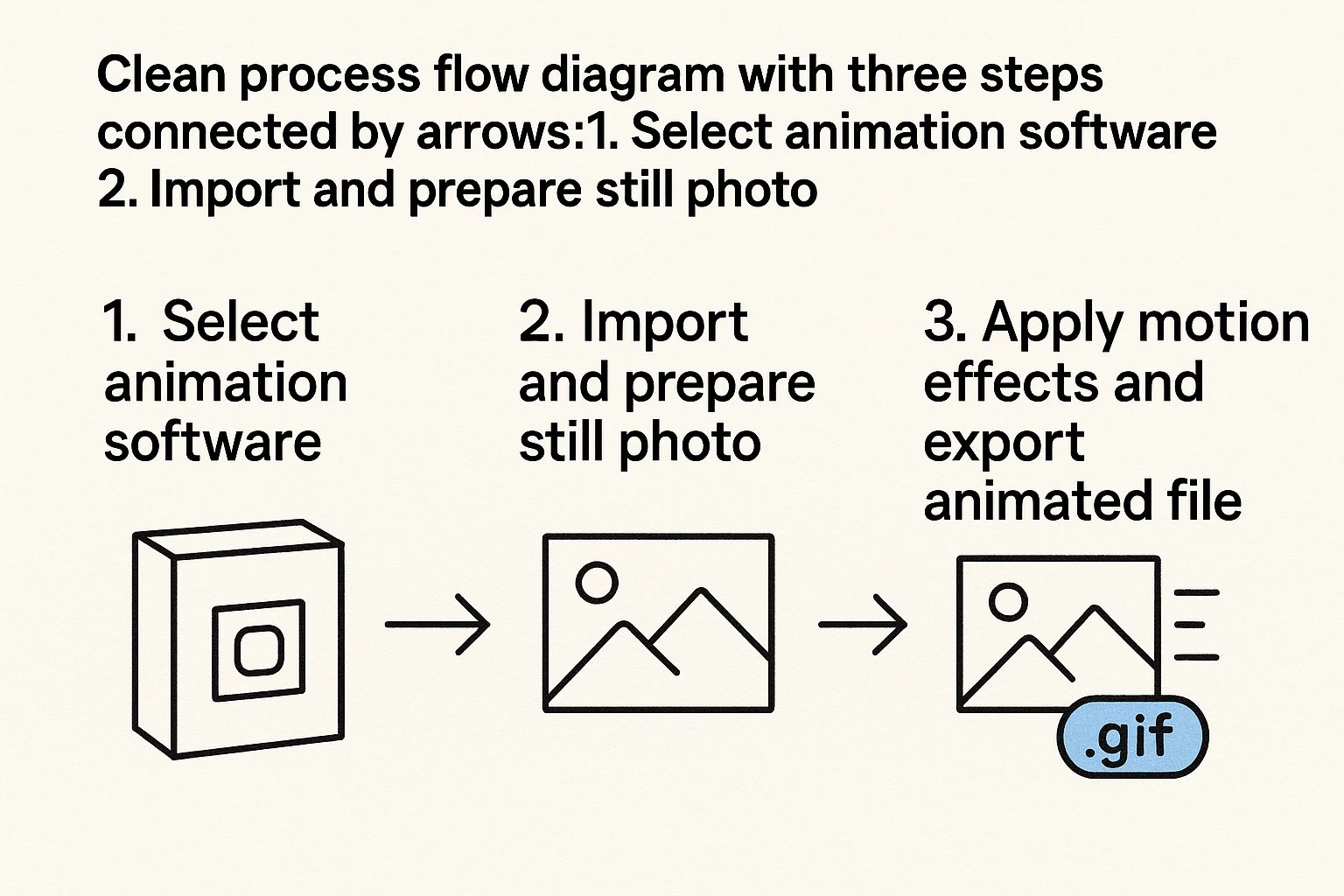
There's an undeniable magic in transforming a still photograph into a moving scene. With Seeddance AI, you're not merely animating an image; you're infusing a frozen moment with vitality. The process is straightforward: upload a high-resolution photo, and the AI begins its analysis, discerning depth and intricate details.
Getting Your Text Prompts Just Right
The prompt you provide is crucial; it dictates the animation's character, distinguishing between a subtle parallax effect and a dramatic camera pan. Crafting the right prompt is an art, but here are some insights:
- Be Specific: Clearly describe the desired motion. Instead of "make it move," try "gentle sway of leaves" or "camera slowly zooms in on the subject."
- Consider Emotion: Does the movement convey the feeling of the image?
- Experiment: Don't be afraid to try different phrasings to achieve varied results.
Finding the Perfect Motion Style
Seeddance AI offers a variety of motion styles to kickstart your creative process. A subtle parallax effect, for instance, is excellent for adding depth by shifting foreground and background elements at different speeds, creating a compelling 3D illusion. Explore options like gentle zooms, pans, or more dynamic effects to match the mood and message of your image.
Creative Techniques for Realistic Motion
Once you've mastered basic zooms and pans, it's time to delve into more advanced techniques to truly bring your static images to life. This is where you transform a simple motion graphic into something that feels alive and tells a story. To achieve truly believable movement, we can draw inspiration from 3D animation. The 3D animation market is projected to reach an impressive USD 52.38 billion by 2032, largely due to these professional techniques becoming more accessible. Consider:
- Layered Movement: Animate different elements of your photo independently.
- Subtle Details: Focus on small, natural movements like flickering light or a gentle breeze.
- Looping: Ensure your animation loops seamlessly for a polished, continuous effect.
The Final Polish: Preview and Export
You're nearly there! Before finalizing your creation, take a moment to preview your animation. Check if the loop is seamless and if the motion feels natural and impactful. This final review ensures your animated photo is ready for its audience.
Exporting and Sharing Your Creation
You've successfully brought your static image to life—now it's time to share it with the world. This final step involves optimizing your animation to look incredible across various platforms, from a TikTok feed to a professional presentation. Ensure you export in the appropriate format and resolution for your intended use.
Answering Your AI Photo Animation Questions
Table: Key Benefits of Animating Still Photos
| Benefit | Description |
|---|---|
| Increased Engagement | Animated visuals capture attention more effectively than static images. |
| Enhanced Storytelling | Add depth and narrative to your photos, conveying emotion and context. |
| Competitive Advantage | Stand out in a crowded digital landscape with dynamic content. |
| Versatility | Use animated photos for social media, marketing, presentations, and more. |
| Ease of Use | AI tools simplify the animation process, making it accessible to everyone. |
| Cost-Effective | Create professional-looking animations without expensive software or expertise. |
Practical Weekly Workflow
To maximize your content output and maintain consistency, consider this workflow:
- Define Weekly Objective: Choose 2-3 content blocks from this guide and set a clear goal for each.
- Draft Content: Create a concise first draft for each selected block.
- Refine and Publish: Improve structure, tone, and clarity before publishing.
- Measure Performance: Compare variants using a single, measurable KPI.
- Optimize: Retain and scale only the formats that consistently outperform your baseline.
Conclusion
The most reliable way to scale content output is through standardization. By maintaining a stable structure, iterating section by section, and scaling only what proves effective, you can consistently produce high-quality, engaging animated content.
Next Step
Explore Seeddance workflow templates: https://seeddance.app/
FAQs
1) Can this workflow work for a solo creator? Yes. Start with a small weekly scope and reuse the same production blocks to build efficiency.
2) How many variants should I test per post? Testing 2 to 4 focused variants is typically sufficient to identify clear winners and optimize your content.
3) Should I prioritize trends or consistency? Leverage trends to expand your reach, but always maintain a consistent format system to build long-term brand recognition and memory.